Your everyday Mac workspace

Everything you need,
always within reach.

Capture anything. Keep it for later, pin it, organize it into Workspaces, or act on it instantly — without breaking your flow.

Native macOS • Local-first • No account required
SOBA — Always within reach.
Why SOBA?

SOBA is the temporary place between finding something and deciding what to do with it.

Drag to SOBA

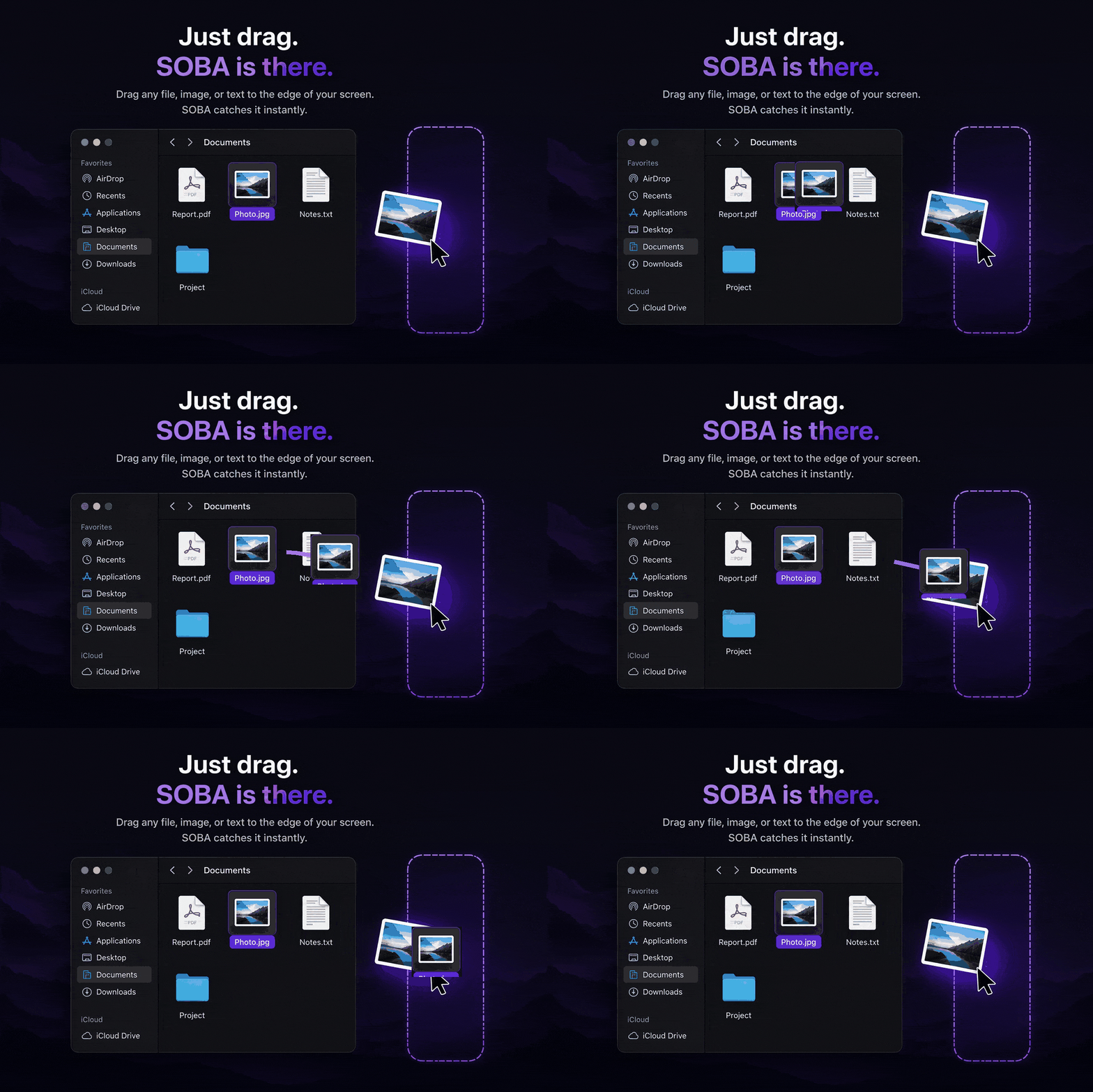
Drag to the edge.
SOBA knows where it goes.

Use the same screen-edge gesture whether you are collecting for a Workspace or just need SOBA for something quick.

Drag any file, image, or text to the screen edge and SOBA catches it instantly

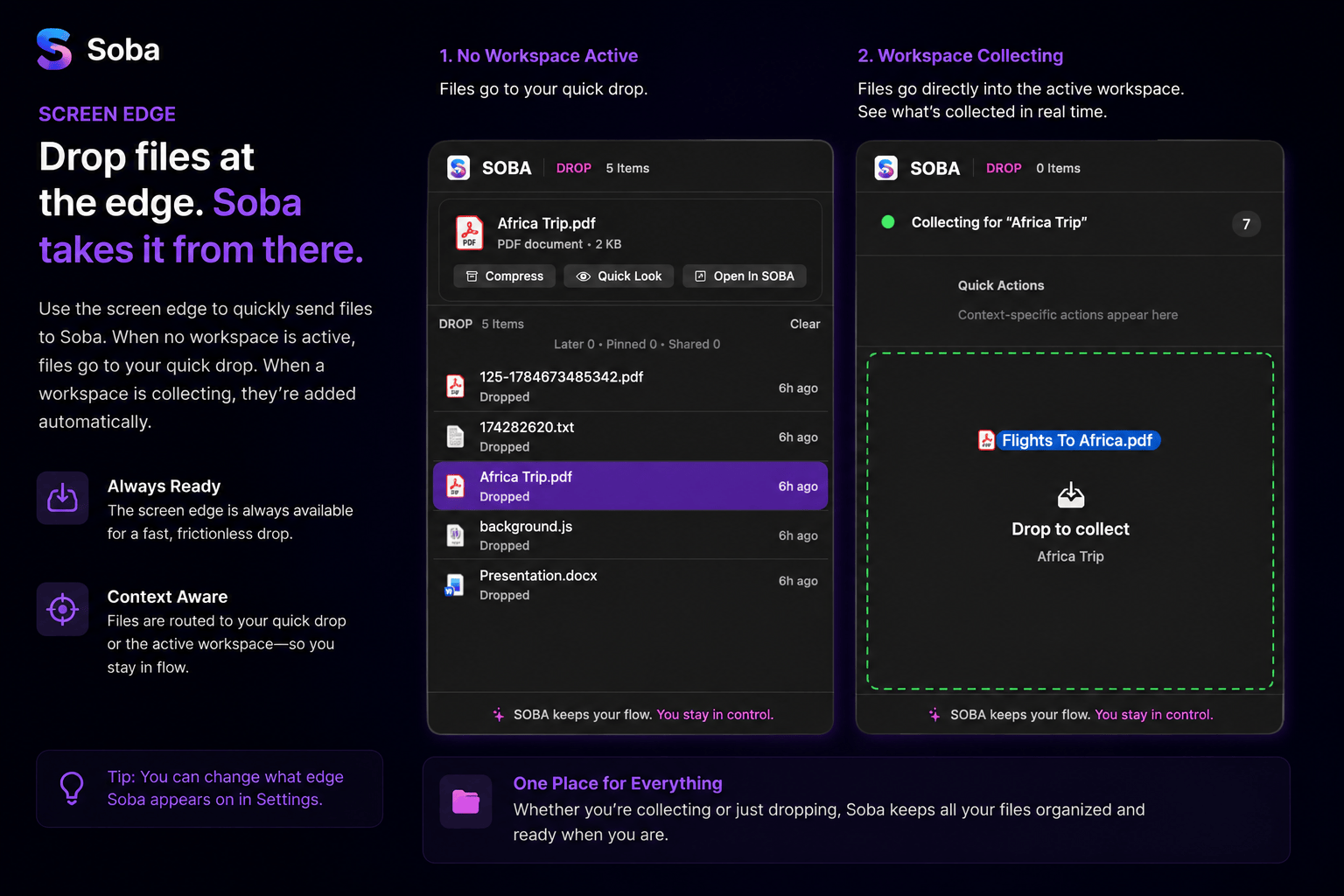
One edge. Two smart ways to drop.

SOBA collecting Africa Trip.pdf into the active Africa Trip Workspace
⌥ S Open SOBA from anywhere.
DROP LATER PIN SHARE ACTIONS
Quick Capture

Type, paste, or drop anything.

Open Quick Capture from anywhere and bring something into SOBA without breaking your flow.

SSOBA
×
Type, paste, or drop anything…
⌘V PasteAa Type↓ Drop
✦ SOBA will understand what it is and suggest actions.
Smart recognition

SOBA knows what you collected.

Useful actions change with the content. If there is ambiguity, SOBA asks instead of guessing.

SOBAClear  ×
☰  1234567890487698764592
◇
TRACKING NUMBERShipping tracking number detected
Recognized
SWhich carrier?

This tracking number's format matches more than one carrier.

Useful next actions

The right options, right there.

Addresses can open Maps. Phone numbers can call or add to Contacts. JSON can validate or format—all without hunting through menus.

⌖
ADDRESSLocation detected
MapsCopy Plain Text
☎
PHONEPhone number detected
CallCopy Plain TextAdd to Contacts
{}
JSONValid structure detected
ValidateCompact / MinifyEscapeCopy as Java String
Timeline

Remember what you worked on.

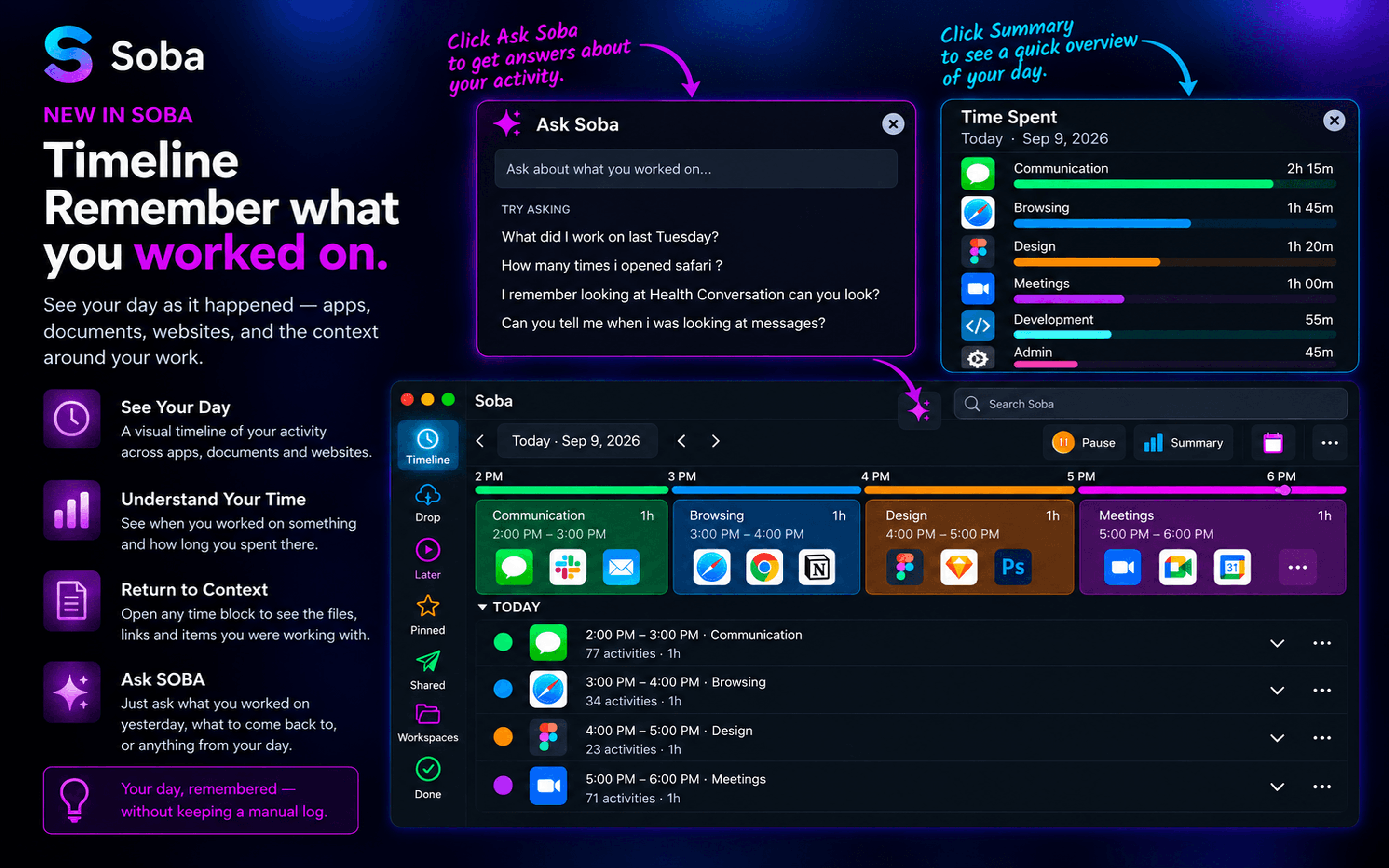
SOBA doesn’t just help with what you need now. It helps you find your way back to what you were doing. Timeline turns your Mac activity into a visual history, helping you understand where your day went and quickly return to the context behind your work.

SOBA Timeline showing hourly activity cards, Ask SOBA, and a Time Spent summary
◷
See your day

Hourly cards turn your activity into a clear visual history instead of a long raw log.

▥
Understand your time

See when you were active, what you were using, and how your time was distributed.

✦
Ask SOBA

Ask natural questions about previous days, apps you opened, or something you remember seeing.

↗
Return to context

Use the timeline and activity details together to understand what happened and pick up where you left off.

Your day, remembered. Without keeping a manual log.
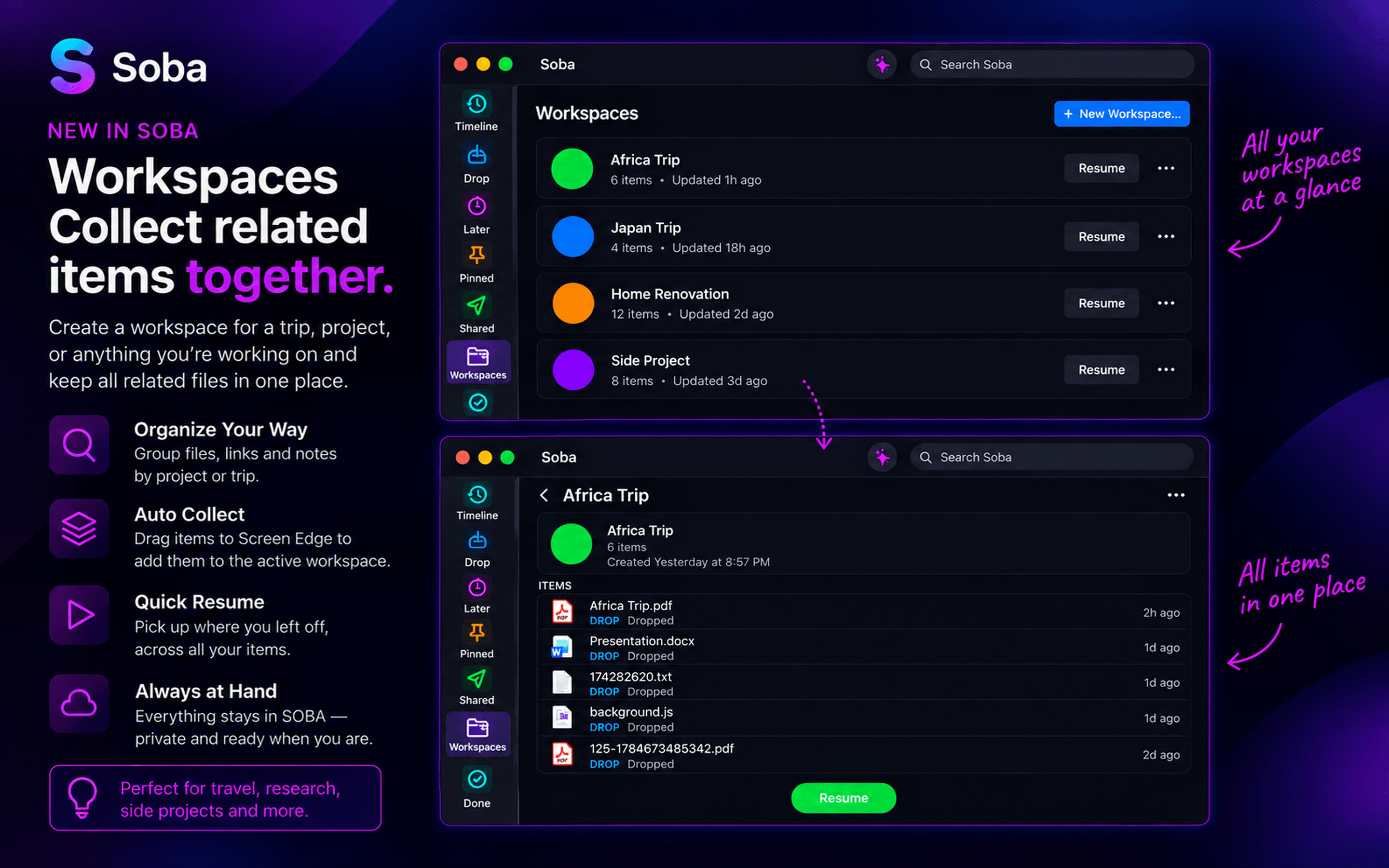
Workspaces

Collect related items into one place.

Create a Workspace for a trip, project, or topic. Drag files, screenshots, and notes into it while you work. Resume collecting later, finish when you’re done, and keep everything together without cluttering your shelf.

SOBA collecting Africa Trip.pdf into the active Africa Trip Workspace
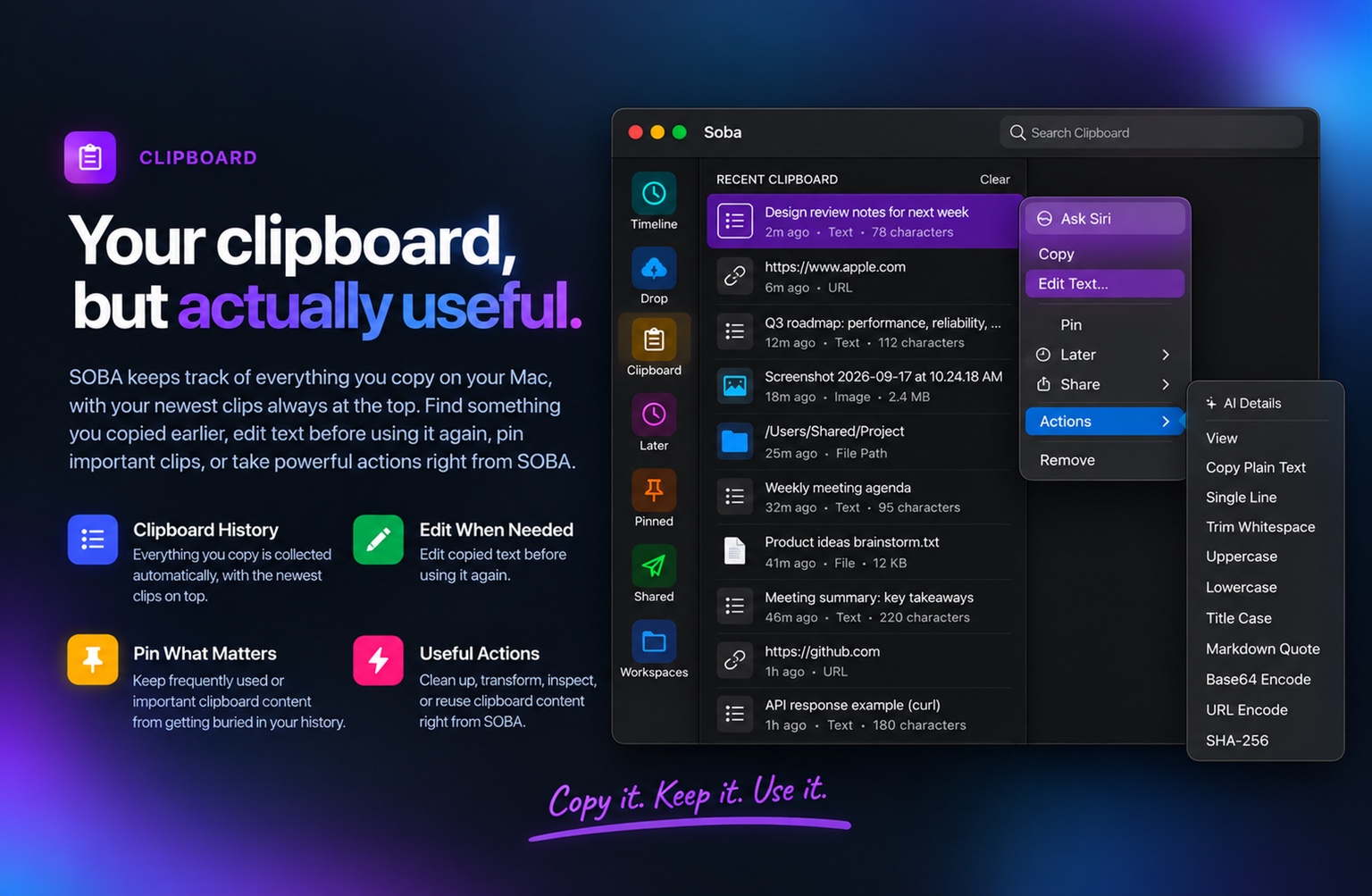
Clipboard

Everything you copy, ready when you need it.

SOBA keeps a history of what you copy on your Mac, with the newest clips always at the top. Browse through your clipboard history to find something you copied earlier, edit text before using it again, pin important clips, and take useful actions—all without interrupting your workflow.

SOBA Clipboard History with Edit Text, Pin, and clipboard Actions
Built for daily use

Fast when you want it.
Quiet when you don’t.

SOBA now adds the small platform details that make a utility feel native: full keyboard control, guided onboarding, Undo, optional iCloud sync, Focus awareness, and fuzzy search across your shelf.

⌨
Keyboard-first

Navigate without touching the mouse.

Use arrow keys to move through the shelf, Quick Capture, and Actions. Press Enter to open the selected item or fire its default action.

↑↓Enter
◎
First-run tour

Discover SOBA in a minute.

A short guided tour introduces Drop, Later, Pin, Share, Quick Capture, screen-edge activation, and contextual Actions without overwhelming first-time users.

↶
Safe by default

Changed your mind? Undo it.

Clear the shelf, remove a pin, or dismiss a Later item with confidence. SOBA gives you a temporary Undo action for reversible cleanup.

Removed from SOBAUndo
☁
Optional iCloud sync

Your setup follows you across your Macs.

Sync preferences and pins through your own iCloud account. It is optional, Apple-managed, and keeps SOBA’s local-first model intact.

MacBookiCloudMac
◐
Focus-aware

SOBA knows when not to interrupt.

During an active Focus session, SOBA can suppress resurfacing cards and click sounds so your workflow stays quiet.

Focus active · SOBA quiet
⌕
Fuzzy shelf search

Find it even if you only remember part of it.

Search across shelf items with partial words and imperfect matches, so a larger shelf stays fast to navigate.

⌕   arch revArchitecture Review Skill
Quick answers

Simple on purpose.

Everything you need to start using SOBA in a few seconds.

How do I open SOBA quickly?

Press ⌥ S from anywhere on your Mac to open Quick Capture. You can type, paste, or drop something and SOBA will show the most useful actions.

What can I put in SOBA?

You can work with files, folders, URLs, text, screenshots, images, clipboard content, JSON, paths, and other everyday content.

What is Drop?

Drop is a temporary shelf. Put something there while you move to another Finder folder, app, Space, or screen, then drag it back out when you need it.

What is Later?

Later brings something back when you are ready for it. Choose tonight, tomorrow, this weekend, next week, or another time without turning it into a complicated task.

What is Pin?

Pin keeps a screenshot, image, note, or reference visible above your work so you do not have to keep switching windows.

How does Share work?

Share lets you quickly send files, URLs, or text to a trusted device. SOBA is designed to favor direct, local-first sharing where possible.

What are Actions?

Actions change depending on what you give SOBA. A URL can offer Open or Clean URL, JSON can offer Format or Validate, an image can offer Resize or Convert, and a project folder can offer Terminal or IDE actions.

Does SOBA require an account?

No. SOBA is designed to work locally on your Mac without requiring an account for its core experience.